How to find and organize work across projects
Short answer
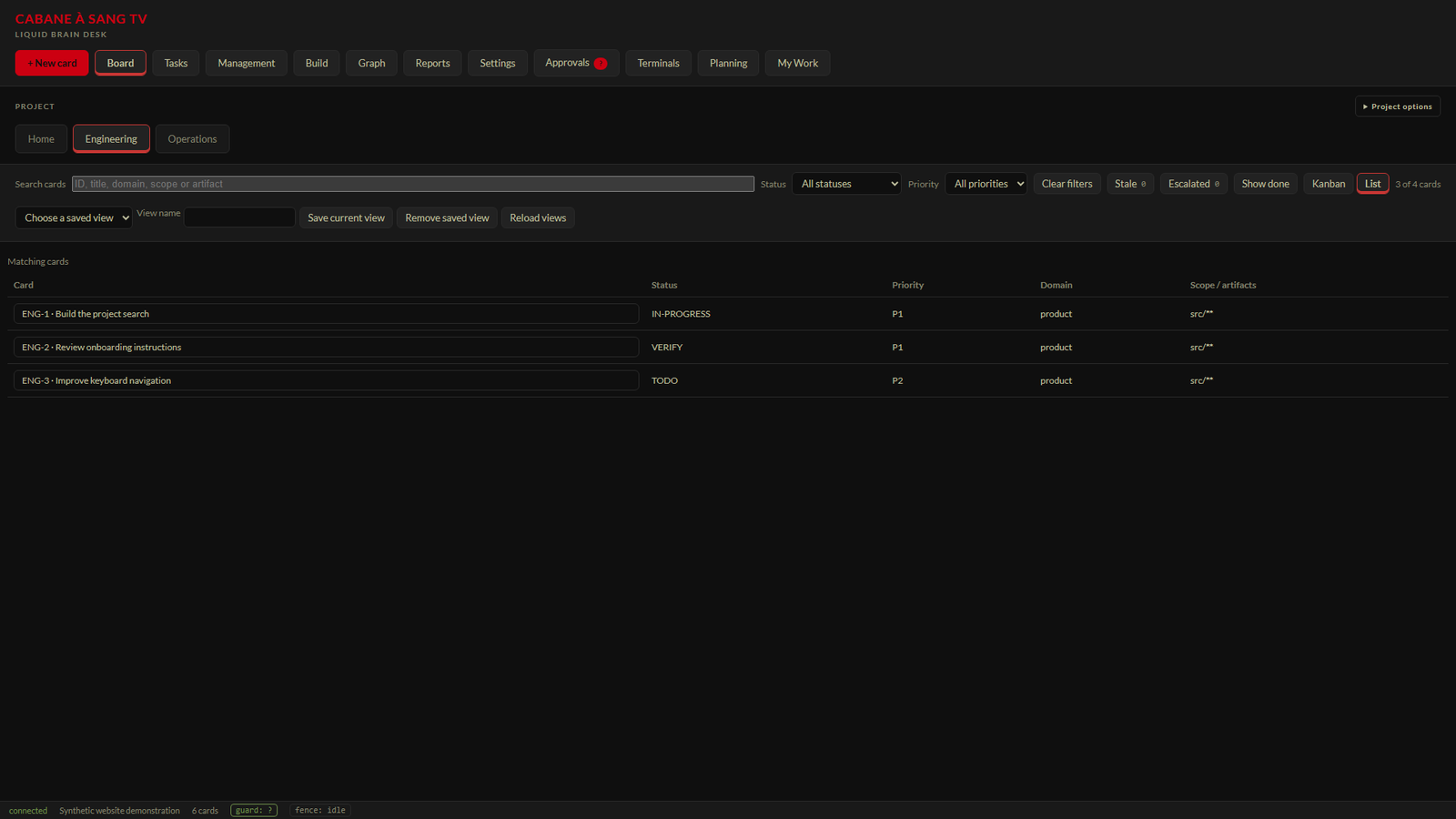
Select a project, search for a card and combine status and priority filters. Use Kanban for the board or List for a compact table. Clear filters when you need to see the broader project again.
Before you start
Open a configured Desk workspace with cards. The Home view spans visible projects; a project tab narrows the view. Project options controls which projects are shown. Hiding a project is a personal display preference, not a change to its permissions.
Search beyond a title
Search cards can match an ID, title, domain, scope or artifact. For example, an ENG identifier finds a specific work record, while documentation finds cards grouped under that domain. Status and Priority narrow the result further. The result count helps explain why a board looks sparse.
Read board states as context
The configured vocabulary can include BACKLOG, TODO, IN-PROGRESS, BLOCKED, VERIFY, DONE, DECISION-OWED, WONT-DO and ON-HOLD. These are not a requirement to move every card through every state. VERIFY means review is still needed; a decision waiting for a person is different from active implementation.
Keep a useful view
The candidate supports named project filter views for search, status, priority and display choices. Select a specific project to use saved views. Saved views organize your own workspace and do not grant access or alter the underlying work.
Select the project tab you want to inspect. Enter a card ID, title phrase, domain, scope or artifact in Search cards. Choose Status or Priority when you need a narrower result. Select List for a compact table or Kanban for board columns. Open a matching card and confirm its project and current status. Use Clear filters and Show done when expanding your search.Steps
Expected result and troubleshooting
The displayed cards should match the chosen project and filters. If a known card is missing, use Clear filters, enable Show done for completed or declined work, and restore hidden projects in Project options. Open a card to confirm its project and status before changing it. Moving a card updates its record; the current move-confirmation feedback is being simplified following owner feedback.
Related questions
- Has hiding a project deleted it?
- No. Project options controls visibility; Show all projects restores hidden project cards in the picker.
- Why is DONE not visible like other columns?
- Completed and declined work can be folded or hidden. Show done includes those cards; a matching status filter can also expose them.
- Does VERIFY mean the work is released?
- No. Implementation, verification evidence, owner acceptance and release are separate records.